
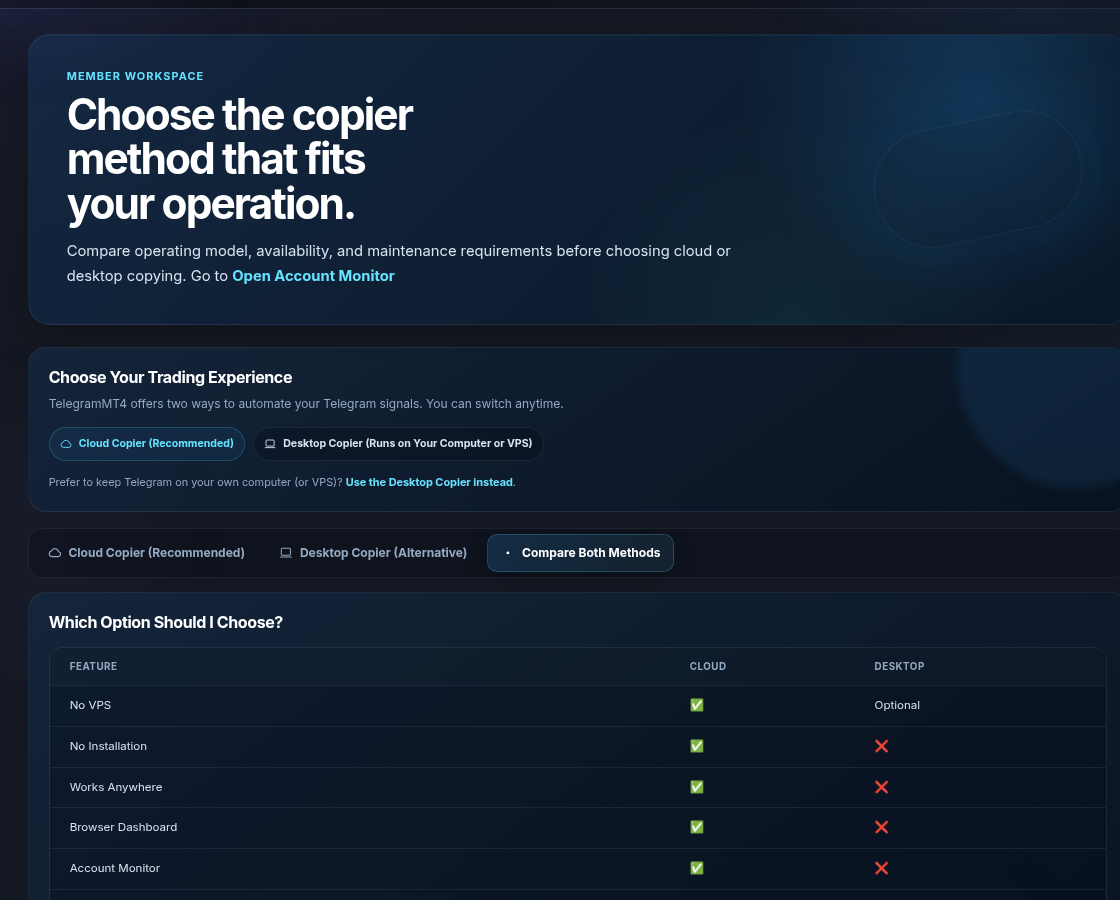
No. The recommended Cloud Copier runs online and is managed from the browser dashboard. A Desktop Copier remains available for traders who prefer local operation.
 Independent-choice framework
Compare copiers by operating model—not buzzwords.
A date-stamped comparison of cloud operation, platform support, signal scope, MT API fees, trial access and evidence. Verify every provider's current site before purchase.
- ✓Reviewed 20 July 2026
- ✓Official sources
- ✓Unknowns labelled
TelegramMT4Cloud copier + optional signalCloud runtimeYes
MT4/MT5Yes
Evidence layerBundled route
Trial7-day demo
AlternativesDifferent specialistsCloud runtimeVerify
MT4/MT5Verify
Evidence layerVaries
TrialVerify
Side-by-side
A transparent selection table
Statements are concise summaries of public product positioning and can change. Open each provider’s official site before purchase.
| Criterion | TelegramMT4 | TSC | TelegramFXCopier | Copygram |
|---|---|---|---|---|
| Primary scope | Cloud copier; signal and bundle routes | Copier specialist | Cloud copier | Cloud copier with broader integrations |
| Cloud / no self-managed VPS | Yes on cloud path | Provider offers cloud and desktop products; verify chosen plan | Yes; verify connectivity prerequisites | Yes; verify current platform route |
| MT4 / MT5 | Yes | Yes | Yes | Yes |
| Signal source included | Available as separate or bundled plan | Not the primary product scope | Not the primary product scope | Not the primary product scope |
| Externally tracked signal evidence | Linked on TelegramMT4 signal pages | Not applicable to copier-only scope | Not applicable to copier-only scope | Not applicable to copier-only scope |
| Trial model | Seven-day demo route published | No | No | No |
| MT API hidden fee | No extra MetaAPI / MT API fee | No extra MetaAPI / MT API fee | Yes — separate MetaAPI purchase required | No extra MetaAPI / MT API fee |
| Trustpilot reviews | 4.8/5Excellent · 113 reviews | 4.4/5Great · Open reviews | 2.3/5Poor · Open reviews | 3.7/5Average · Open reviews |
| Best fit | Users wanting visible automation controls and optional bundled signal | Users seeking a dedicated copier product | Users wanting a cloud copier and willing to pay a separate MetaAPI fee | Users prioritising broader platform integrations |
Research date: 20 July 2026. “Verify” is used where plan-level or technical detail can change or could not be established consistently from a primary public page.
Comparison method
Six criteria that matter more than an AI label or latency headline
Select the architecture and control model that fits your actual workflow.
Operating model
Cloud, desktop, extension or local EA; identify what must stay online.
Scope
Copier only, signal only or one combined ecosystem.
Connectivity
Included broker route, third-party API or user-hosted terminal.
Control
Per-source rules, account routing, event history and stop controls.
Evidence
Independent product reviews and strategy history are different proof types.
Total cost
Plan, account tier, API, VPS, support and renewal period.
TelegramMT4 position
Differentiate through visible control and evidence
A copier only copies. It does not repair a bad channel, a rejected symbol, or an account you cannot afford to lose. Compare tools on how they run and how they fail, then test on a demo.
- Signal, parser, rules and broker response shown as separate stages
- Cloud convenience paired with connection-health visibility
- Demo-first evaluation before a paid or live decision
- Comparisons date-stamped and linked to official providers
Where the copier runs
Cloud, a machine you keep online, or a marketplace
Most Telegram copiers fall into one of these. TelegramMT4 ships the first two. Cloud is the default. Desktop is there if you want the Telegram session on your own computer or VPS.
| Type | What you operate | Usual trade-off |
|---|---|---|
| Cloud dashboard | Browser. Telegram and MT4/MT5 stay connected on the vendor’s side. | Less machine babysitting. You trust that vendor with the session you authorize. |
| Desktop app or EA on your PC / VPS | Windows, or a VPS image, must stay online. | You keep the session on hardware you rent or own. You also keep the uptime problem. |
| Marketplace / social copy | You copy another MT4/MT5 account, not a Telegram text channel. | Different product. Use it for account-to-account copy, not channel parsing. |
What to ask every vendor
Skip “fastest” and “smartest.” Ask what a trial can prove.
Last reviewed 25 August 2026. These are the checks we use, including on TelegramMT4.
Telegram scope
Does it watch only the channels you attach? We document authorized channels on the security page.
MT4 and MT5
Both, or one? We connect both from the same dashboard.
Symbols
Auto should match GOLD, XAUUSD, and broker suffixes. Manual mapping should be optional, not the only path.
Routing
Can one Telegram source feed one account, and a second source feed another?
Risk controls
Lot size, max positions, and filters. If those are missing, you are renting a firehose.
Trial and company
Ours is seven days on one demo account. We are Telegram MT4 Copier LTD, Hayle, United Kingdom. About.
A week of testing
How to test any of them, including us
- Open a demo MT4 or MT5 account at your real broker, not a contest server.
- Connect one quiet channel first. Confirm the symbol matches the name your Market Watch trades.
- Wait for a modify or close if your provider uses those. Parsers fail on updates more often than on the first entry.
- Add a second account only after the first one is boringly correct.
- If there is no company name on the legal pages, stop.
Our trial starts at the 7-day demo. Named pages: vs TSC, vs TelegramFXCopier, vs Copygram, vs SignalStart. Account-to-account copying is a separate product: .
Questions before connection
Practical answers without fine-print surprises
These answers describe how the product works today. They are not a promise of profit.
No local copier installation is required for the cloud platform. Connect Telegram and your MT4/MT5 account from the browser dashboard.
Yes. We guide new traders step by step — from learning basics to reviewing verified results and understanding risks before subscribing.
Yes. The cloud copier can copy signal from channels you authorize, subject to your plan limits.
MT4 and MT5 accounts that accept the login used in setup. Search your broker server there. We do not test every broker. If the login fails, the account stays disconnected and no orders are sent.
Yes. Trading involves substantial risk of loss. Past performance is not indicative of future results. Only trade with capital you can afford to lose.
TelegramMT4 requires Telegram connection only to detect trading signals and provide automation. The system processes messages needed for signal copying functionality. Your information is protected, and TelegramMT4 does not sell, share, or use your Telegram data for unrelated purposes.
Prop-firm rules differ, and some firms prohibit or restrict copy trading, EAs, or third-party automation. You must confirm permission with your firm before connecting an account.
TelegramMT4 does not guarantee that activity is undetectable or permitted. Not installing an Expert Advisor is not a way to avoid firm rules. Drawdown, consistency, and manual-trading rules still apply.
Choose by workflow, control and evidence
Use the comparison to form a shortlist, then test the preferred path on demo.
Start free trialView pricingTrading involves risk. Demo testing is recommended.